Automotica Keynote Templates for Professional and Creative Presentations
Presentations are a powerful way to share ideas, whether you're pitching a business plan, delivering a keynote speech, or teaching a class. But even the most compelling message can fall flat if it's not presented clearly and stylishly. That’s where Automotica Keynote Templates come in handy. These templates offer a clean, creative, and flexible design that helps users craft visually engaging slides with ease. Ideal for both personal and professional use, they’re built to adapt to a wide range of presentation needs while maintaining an impressive style.
What Makes Automotica Keynote Templates Unique?
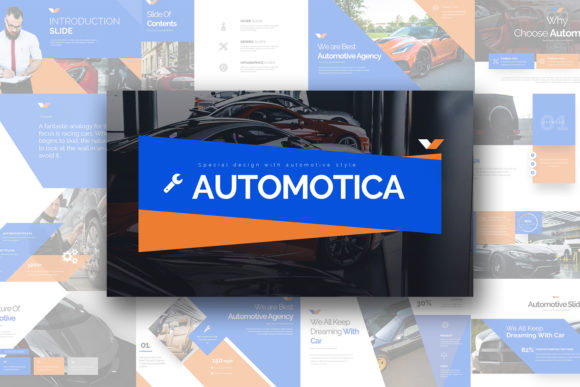
If you’ve ever struggled with clunky slide designs or spent hours tweaking layouts in Keynote, you know how frustrating it can be. Automotica Keynote Templates solve this by providing a ready-to-use structure that’s both simple and scalable. The template is packed with 30 unique slides—each designed to fit different presentation scenarios—from storytelling to data visualization. With 180 total slides available, you have plenty of variety to work with without repeating content.
The aspect ratio (16:9) ensures compatibility across all modern screens, making your presentations look sharp on laptops, projectors, or tablets. Plus, the three color schemes included—one on white background and two on dark—let you choose a style that matches your brand or the mood of your presentation. Whether you're going for a sleek corporate vibe or something more dynamic and creative, these options help you stand out from the crowd.
Real-World Uses Across Different Fields
Entrepreneurs and Startups: When presenting to investors, clarity and professionalism are key. Automotica Keynote Templates provide a polished look that makes your startup story shine. For example, imagine you're preparing a pitch deck for a new app idea. You can use the vector icons and image placeholders to quickly add visuals, while the editable charts allow you to insert real-time financial projections directly from Excel.
Marketers and Advertisers: Marketing teams often need to present campaign ideas, performance reports, or client proposals. These templates offer a fresh design that supports both text-heavy and media-rich slides. A marketer might start with a title slide using the dark version of the template for a dramatic effect, then switch to white backgrounds for detailed analytics slides. The flexibility means you can maintain a consistent brand identity throughout while keeping the audience engaged.
Educators and Trainers: If you're designing a training module or lecture, Automotica Keynote Templates can streamline the process. Their multipurpose nature allows educators to create interactive lessons with diagrams, timelines, and infographics. Because all elements are easily editable, teachers can customize slides to match their curriculum or highlight important concepts without needing advanced design skills.
Creative Professionals: Designers, bloggers, and hobbyists who want to showcase their work will appreciate the creative edge these templates offer. The unique slides support visual storytelling, which is perfect for portfolios or blog post summaries. You can replace image placeholders with your own photos and adjust colors to reflect your personal style. The free font use also ensures that your branding stays consistent without worrying about licensing issues.
Freelancers and Small Business Owners: Freelancers and small businesses often juggle multiple clients or projects. Having a go-to presentation template saves time and effort. For instance, a freelance graphic designer could use the same template to present proposals to different clients, simply changing the color scheme and adding relevant images. The scalability of the design means it works just as well for a one-on-one meeting as it does for a larger conference.
Why Choose Automotica Over Other Presentation Tools?
Many people reach for PowerPoint when creating slides, but Keynote offers smoother animations and better integration with Apple devices. However, even with Keynote’s strengths, finding the right template can still be a challenge. Automotica Keynote Templates simplify this by offering a balanced mix of simplicity and creativity. They’re not too flashy, but they avoid being dull—a rare sweet spot in presentation design.
Consider a scenario where you're preparing for a product launch. You’ll likely need a blend of slides showing market research, product features, pricing strategies, and team introductions. Automotica provides dedicated slides for each of these sections, allowing you to focus on the content rather than the layout. The documentation and quick guide file make it easy to get started, even for those who aren’t tech-savvy.
Customization Without the Hassle
One of the standout qualities of Automotica Keynote Templates is their full customizability. Every element—text boxes, icons, charts—is editable, so you can tailor the design to your specific needs. For example, if you're presenting quarterly sales figures, you can open the chart in Excel, update the data, and return to Keynote with a perfectly formatted infographic. This level of control is especially valuable when you need to revise your presentation last-minute or adapt it for different audiences.
The vector icons included in the files are another bonus. Unlike raster images, vector graphics scale without losing quality, so your logos or illustrations stay crisp on any screen size. This is particularly useful when you’re embedding your slides into websites or sharing them online via platforms like YouTube or SlideShare.
Key Considerations Before Using Automotica Keynote Templates
Before diving into Automotica Keynote Templates, there are a few things to keep in mind. First, the template assumes you already have a basic understanding of Keynote. While the quick guide file walks you through installation and setup, it doesn’t include step-by-step instructions for every feature. That said, the intuitive layout and clean design mean most users should feel comfortable navigating it within minutes.
Another thing to note is that stock photos are not included in the template. This may seem like a drawback at first, but it actually encourages you to use high-quality images that reflect your own work or brand. There are plenty of affordable stock photo sites like Unsplash, Shutterstock, and Pexels where you can find suitable images to pair with your slides.
Also, consider the purpose of your presentation before selecting a color scheme. Dark backgrounds are great for evening events or more dramatic themes, while white backgrounds tend to work better in brightly lit rooms or for corporate settings. The choice here affects not just aesthetics but also readability and audience engagement.
Getting Started with Your Download
After downloading the template, it’s important to install the included fonts before opening the presentation. This ensures that the typography remains consistent and looks exactly as intended. Once installed, you can begin replacing image placeholders, adjusting text blocks, and modifying charts to suit your message.
Let’s say you're planning a company-wide meeting. You download the template, install the fonts, and start building your agenda. You use the timeline slides to show progress over the past year and the comparison slides to highlight upcoming goals. The result is a professional-looking presentation that feels personalized and effective—all without hiring a designer.
Final Thoughts on Practical Use
In today’s fast-paced world, time is valuable. Automotica Keynote Templates save you from starting from scratch and let you focus on what really matters—your message. Whether you're an educator, entrepreneur, or freelancer, these templates give you the tools to create impactful presentations that resonate with your audience. And because they’re fully customizable, you can make them your own without compromising on quality or style.
So next time you need to present an idea, don’t waste time searching for the perfect template. Go with Automotica Keynote Templates and deliver your message with confidence and clarity.