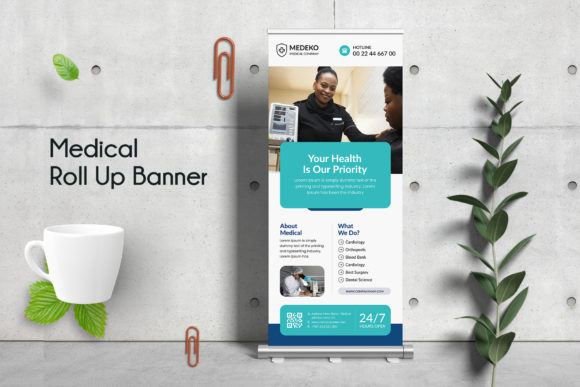
Medical Roll Up Banner Design: A Practical Guide for Effective Marketing
Medical roll up banner design is a powerful tool for healthcare professionals, clinics, hospitals, and medical service providers to communicate their message in a visually compelling way. Whether you're advertising a new wellness program, promoting a conference, or setting up a booth at a trade show, the right banner can make all the difference. But creating an effective Medical Roll Up Banner Design isn’t just about picking a template and adding some text—it requires attention to detail, understanding of branding, and awareness of common pitfalls that many overlook.
What Is a Medical Roll Up Banner?
A medical roll up banner is a portable signage solution used in various settings such as exhibitions, waiting rooms, seminar halls, and health fairs. It typically features high-quality graphics, essential messaging, and branding elements like logos and colors. The key is to design it so it stands out while conveying professionalism and trust—qualities that are especially important in the healthcare industry.
Why People Choose This Medical Roll Up Banner Template
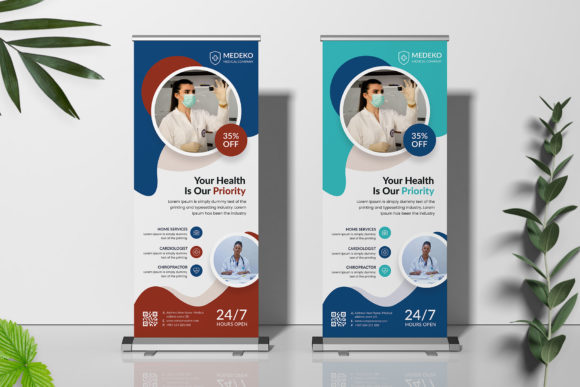
Many creators, marketers, and small business owners turn to pre-made templates to save time and ensure a polished look. This medical roll up banner template is particularly popular because it’s built with Adobe Photoshop, uses smart objects for easy editing, and includes organized layers. It supports print-ready formats at 150 DPI resolution with CMYK color mode, which is crucial for professional printing. Plus, it’s sized at 30 x 70 inches with a 0.25” bleed, making it suitable for most standard roll-up displays.
The use of free and widely available Google Fonts ensures accessibility without compromising on style. Being fully editable means users can customize everything from the logo placement to background images, allowing them to tailor the design precisely to their brand identity.
Common Mistakes When Using Medical Roll Up Banner Templates
- Ignoring Resolution Requirements: One of the biggest mistakes is using low-resolution images or not adjusting the file to meet the 150 DPI requirement. This can result in blurry prints that undermine your professional image.
- Misusing Color Modes: Failing to switch from RGB to CMYK before sending the design to print can lead to unexpected color shifts. Always double-check the color mode in Photoshop to match printer specifications.
- Overlooking Bleed Margins: If you don’t account for the 0.25” bleed when designing, parts of your content might be cut off during the printing process. Keep all critical elements within the safe area to avoid this issue.
- Using Incompatible Fonts: While the template uses free fonts, not embedding or confirming font availability can cause issues when sharing or printing the design. Use the ‘Convert to Shape’ option if necessary to preserve the layout.
- Poor Layer Organization: Even though the template has well-organized layers, beginners sometimes rename or merge them without understanding the structure. This can complicate future edits and reduce the usability of the file.
How These Errors Impact Your Results
Each mistake mentioned above can have real consequences. For example, a poorly designed banner with incorrect resolution may appear unprofessional and fail to attract attention at events. Misaligned colors can confuse viewers and dilute your brand's visual consistency. Overlooking bleed margins could mean losing part of your graphic or text entirely, leading to wasted time and money on reprints.
Additionally, poor layer management can frustrate users who need to make quick changes later. If the banner isn't optimized for editing, it becomes difficult to update information, adjust layouts, or tweak visuals. This reduces efficiency and increases the risk of errors during revisions.
1. Verify Print Specifications
Before finalizing your Medical Roll Up Banner Design, confirm the printer’s requirements. Most professional printers expect files in CMYK format with a minimum of 150 DPI. Ensure that any photos or graphics included are also high-resolution to maintain clarity in the final output.
2. Keep Important Elements Within Safe Margins
Even if your design extends beyond the visible area, keep all essential text and logos inside the 0.25” bleed margin. This prevents accidental trimming and maintains the integrity of your message. Use guides or rulers in Photoshop to visualize the safe zone clearly.
3. Understand Smart Objects and Layers
If you’re new to Photoshop, take time to learn how smart objects work. They allow non-destructive editing, meaning you can scale or modify images and text without losing quality. Also, familiarize yourself with the template’s layer structure to edit efficiently without disrupting other elements.
4. Test Your Design Before Printing
Always create a proof version of your Medical Roll Up Banner Design. Print a small section at home or send it to a digital printer for a test run. This helps catch alignment, color, or resolution problems early and saves costs in the long run.
5. Stick to a Professional Color Scheme
Healthcare brands often rely on clean, calming colors like blues, greens, and whites. However, it’s important to stick to one or two primary colors for consistency. This Medical Roll Up Banner Template offers two-color options, which makes it ideal for maintaining brand coherence without overwhelming the viewer.
6. Don’t Forget to Replace Placeholder Content
It’s easy to miss updating placeholder text or images when working with templates. Always go through every layer and replace placeholders with your actual content. Remember, the images shown in the preview mockups are not included in the PSD file—you’ll need to source your own relevant visuals.
Realistic Examples and Better Approaches
Let’s say you’re preparing a banner for a hospital open house event. You might start by selecting a stock photo of smiling patients and doctors. But instead of using a generic royalty-free image, consider hiring a local photographer or using authentic photos from past events. This builds trust and authenticity in your Medical Roll Up Banner Design.
Another example involves color usage. Suppose you’ve chosen a bright red accent for your banner, thinking it will grab attention. While bold colors can be effective, they might clash with your brand guidelines or appear too aggressive in a healthcare context. Opt for softer tones that reflect care, trust, and professionalism.
For typography, avoid overly decorative fonts that are hard to read from a distance. The Medical Roll Up Banner Template uses Google Fonts, which are both free and legible. Stick to one font family for headings and body text unless you have a clear reason to mix styles.
What to Check Before Finalizing Your Medical Roll Up Banner Design
- Resolution: Confirm that all images are at least 300 DPI for crisp, professional results.
- Color Mode: Make sure your Photoshop document is set to CMYK mode for accurate color reproduction.
- Bleed Settings: Double-check that your content doesn’t extend into the trim area beyond the 0.25” bleed.
- Font Availability: If you plan to share the file, convert text layers to shapes or outlines to prevent missing fonts from causing layout issues.
- Layer Structure: Maintain the original layer organization unless you’re confident in your Photoshop skills. This ensures easier modifications later.
- Content Accuracy: Review all text for typos, correct dates, and accurate branding details. A single error can mislead or damage credibility.
Final Thoughts on Medical Roll Up Banner Design
Creating an impactful Medical Roll Up Banner Design is more than just assembling a template—it’s about aligning your message with your brand’s values and ensuring technical accuracy. By avoiding common mistakes like ignoring resolution, mismanaging colors, or neglecting bleed areas, you can significantly improve the effectiveness of your marketing materials.
This Medical Roll Up Banner Template provides a solid foundation, but it’s up to you to fill it with purposeful content and thoughtful design choices. With its structured layers, smart objects, and user-friendly layout, it empowers both beginners and professionals to produce banners that stand out for the right reasons.