Modern Annual Report InDesign: A Professional and Adaptable Design Tool
Creating an annual report is more than just compiling data—it's about presenting a compelling narrative that reflects your company’s achievements, values, and future direction. For professionals who need to produce high-quality reports efficiently, Modern Annual Report InDesign offers a robust solution. This template combines sleek design with functional structure, making it a go-to resource for businesses looking to communicate effectively with stakeholders, investors, or internal teams.
What Is Modern Annual Report InDesign?
Modern Annual Report InDesign is a digital template designed specifically for Adobe InDesign users. It serves as a foundation for crafting professional annual reports with minimal effort. The template features a clean, contemporary aesthetic that aligns with modern branding standards, while also offering the flexibility needed to tailor content to specific business needs.
Unlike generic templates that often feel outdated or overly complex, this one strikes a balance between simplicity and sophistication. Its design elements—such as layout, typography, and color scheme—are carefully curated to ensure clarity and visual appeal without overwhelming the reader with unnecessary graphics or clutter.
Key Characteristics of the Template
- 24-Page Structure: The template provides a comprehensive yet concise format ideal for most corporate annual reporting needs.
- Two Paper Sizes: Available in both US Letter (8.5 x 11 inches) and International A4 (210 x 297 mm), it supports global usage and printing requirements.
- Three File Formats: Comes in InDesign (.indd, .idml), Word, and PDF formats, allowing for cross-platform editing and finalization.
- Customizable Elements: Text, images, fonts, and colors can be easily adjusted using Adobe InDesign or Microsoft Word, enabling seamless personalization.
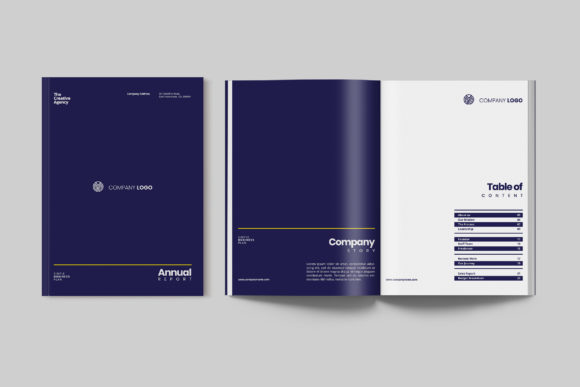
- Color Scheme: A blue-based palette with yellow accents delivers a fresh, modern look that enhances readability and engagement.
This combination makes it suitable for startups, corporations, non-profits, and other organizations aiming to present their financial performance, strategic goals, and operational insights in a polished manner.
Strengths That Stand Out
The standout feature of Modern Annual Report InDesign is its thoughtful organization. Each section—from the cover page to financial summaries—is logically arranged, ensuring a smooth flow of information. The use of white space is particularly effective, reducing cognitive load and helping readers focus on key messages.
Another strength lies in its adaptability. Whether you're a marketing manager preparing a report for a board meeting or a small business owner wanting to showcase growth to potential partners, this template can be customized to suit varying levels of complexity. The modular design allows for easy insertion of charts, infographics, and brand assets, supporting diverse storytelling approaches.
Additionally, the inclusion of multiple file formats is a major advantage. The InDesign files allow for deep customization and typographic precision, while the Word version ensures accessibility for team members without InDesign licenses. The ready-to-print PDF is invaluable for distributing the final document quickly and professionally.
Usability and Practical Value
In real-world applications, usability is a top priority. Modern Annual Report InDesign excels in this area by offering intuitive navigation within the template. Users can easily replace placeholder text with actual content, adjust image placements, and modify font styles without compromising the overall design integrity.
For example, a mid-sized tech startup might use this template to highlight product milestones, customer growth, and funding rounds. With the right content, the template’s bold headings and structured layouts help emphasize key points without requiring advanced graphic design skills.
Its consistent layout across all pages is especially useful when dealing with large volumes of data. Charts and tables are neatly integrated into the design, maintaining a professional tone while allowing for clear data visualization. This consistency helps maintain brand identity and ensures that the report feels cohesive from start to finish.
Who Benefits Most from This Template?
While Modern Annual Report InDesign is versatile enough for many industries, certain professionals will find it particularly beneficial:
- Corporate Communications Teams: Needing to create reports that reflect a company's brand and message with minimal back-and-forth design revisions.
- Entrepreneurs and Start-ups: Looking to present their progress and strategy in a professional format without hiring a designer.
- Freelance Designers: Who want a reliable base template to streamline their workflow and deliver results faster.
- Non-Profit Organizations: Seeking to inform donors and stakeholders clearly and visually appealingly.
- Marketing Managers: Required to include case studies, testimonials, and campaign highlights in a structured report.
It’s also ideal for those who value time efficiency but still require a high standard of presentation. If you're working under tight deadlines or managing a lean team, this template can significantly reduce the time spent on formatting and layout design.
Evaluating Long-Term Value and Reliability
When assessing long-term value, Modern Annual Report InDesign proves to be a reliable asset. The clean and adaptable design means it won't look out of date in a few years. Additionally, because it's built on industry-standard software like Adobe InDesign, there's no risk of compatibility issues or obsolescence.
Reliability extends beyond technical aspects. The template includes ‘Help’ documents that guide users through setup and customization, which is essential for those unfamiliar with InDesign. However, if these resources don’t fully meet your needs, support is available via the provider’s team, ensuring you can overcome any initial learning curve.
Over time, users may appreciate how the template grows with their business. As a company expands and evolves, the ability to reuse and restructure the same framework each year saves considerable effort and cost. The modular nature also makes it easy to update only the necessary sections annually.
Possible Limitations and Considerations
Despite its strengths, there are a few limitations worth noting. First, the template assumes a basic understanding of Adobe InDesign. While it does offer helpful documentation, users without prior experience may need to invest some time in learning the software's fundamentals.
Second, while the template is highly customizable, it may not cater to very niche industries or unconventional reporting styles. If your annual report requires unique interactive elements or heavy multimedia integration, additional design work outside the template might be necessary.
Lastly, the 24-page limit could be restrictive for larger enterprises with extensive reporting needs. Although the template is well-suited for most businesses, those requiring over 50 pages might need to expand it manually or consider a different tool altogether.
How to Make the Most of the Template
To maximize the utility of Modern Annual Report InDesign, follow these practical steps:
- Understand Your Audience: Tailor the content and visuals to match the expectations of your target readers—whether they’re investors, employees, or clients.
- Plan Your Content: Organize key sections such as executive summaries, financial highlights, and strategic objectives before inserting them into the template.
- Use High-Quality Assets: Replace stock images and placeholder texts with original content to maintain authenticity and professionalism.
- Review Layout Consistency: Ensure that all pages adhere to the same design principles to avoid jarring transitions or visual inconsistencies.
- Leverage Multiple Formats: Use the InDesign version for detailed edits, the Word version for collaborative input, and the PDF for distribution.
By following these recommendations, you can transform the template into a powerful communication tool that reflects your company's professionalism and attention to detail.
Final Thoughts on Modern Annual Report InDesign
Modern Annual Report InDesign is a well-crafted solution for businesses seeking to create impactful annual reports without the hassle of starting from scratch. Its blend of aesthetics and functionality caters to a wide range of industries and project scopes. While it may not be perfect for every situation, it provides a strong foundation for those who prioritize efficiency, clarity, and visual appeal.
If you're looking to elevate your company's annual report and streamline your design process, this template is worth exploring. Just make sure to assess whether its structure and style align with your brand voice and audience expectations. When used thoughtfully, it can become an essential part of your content creation toolkit.