MS Word Resume and Cover Letter Template: A Strategic Tool for Professional Success
Your resume and cover letter are more than just documents—they are your first impression, your brand statement, and your opportunity to stand out in a competitive job market. When crafted with intention and presented in a professional format, these tools can significantly enhance your chances of securing interviews and landing the right role. The MS Word Resume and Cover Letter Template is designed to help you do exactly that. It combines functionality, flexibility, and aesthetic appeal to create compelling documents that align with modern hiring expectations.
What Is the MS Word Resume and Cover Letter Template?
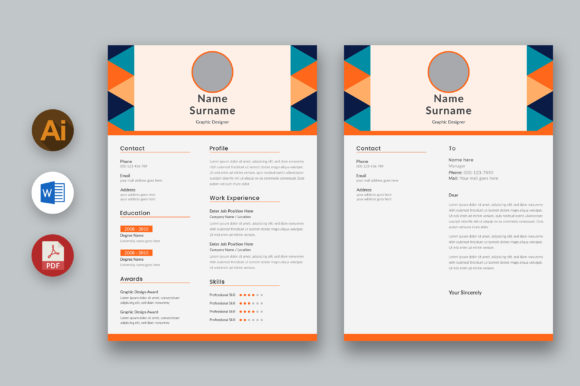
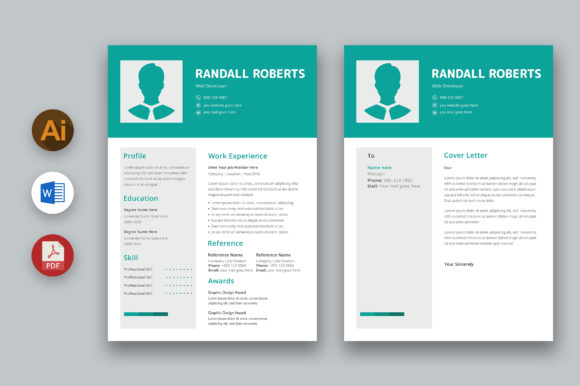
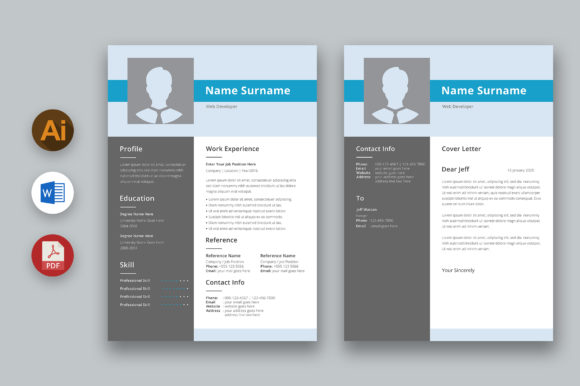
The MS Word Resume and Cover Letter Template is a pre-designed document layout tailored for professionals seeking to present their qualifications effectively. This template is built with clean lines, strategic white space, and a contemporary visual style that makes it easy for hiring managers to scan and absorb key details quickly.
Unlike generic templates found online, this one offers a modern and neat design that helps you communicate professionalism while standing apart from the competition. Its structure supports clear organization of information—skills, experience, education, and contact details—allowing you to highlight what matters most without overwhelming the reader.
Key Features That Make It Stand Out
- CMYK Color Support: Ensures accurate color representation when printed, which is crucial if you plan to submit physical copies during interviews or networking events.
- 300 DPI Resolution: Provides high-quality images and graphics suitable for both digital and print use.
- Free Font Compatibility: Uses accessible fonts that maintain readability across all platforms and devices.
- 8.5×11 Inches Format: Standard paper size ensures compatibility with most printing systems and HR software.
- 0.25 Inches Bleed Area: Ideal for adding personal touches like logos or background elements without worrying about trimming issues.
- Easy Customization: Offers full editability in Adobe Illustrator, MS Word, and PDF formats, giving you control over every detail—from text to color schemes.
- Print-Ready Format: Designed for immediate use in professional settings, eliminating the need for time-consuming formatting adjustments before printing.
Strategic Use of the Template in Professional Contexts
When used thoughtfully, the MS Word Resume and Cover Letter Template can support multiple strategic goals. Whether you're applying for a corporate position, launching a freelance career, or rebranding after a long hiatus, the template adapts to fit your needs.
Positioning Your Brand Effectively
In today’s market, your resume is often the first touchpoint between you and a potential employer. A well-designed resume communicates not only your skills but also your attention to detail and brand identity. The modern and clean look of this template allows your content to take center stage, ensuring your unique value proposition isn’t lost in clutter.
Consider how you want to be perceived. If you’re targeting a creative industry such as graphic design or marketing, using a visually appealing template can reinforce your creativity. For technical or finance roles, the same template can emphasize clarity and precision by highlighting data-driven achievements in a structured format.
Enhancing Communication and Creativity
A resume is essentially a form of communication. The MS Word Resume and Cover Letter Template empowers you to craft a message that resonates with the hiring manager. By organizing your information into logical sections, the template supports storytelling through bullet points and concise summaries.
For example, instead of listing job duties, you could frame them as outcomes: “Led cross-functional team to increase customer retention by 20% within six months.” This approach not only showcases your abilities but also tells a story of impact.
Additionally, the customizable nature of the template allows you to experiment with layout and design to match your personality and the company culture you're applying to. You might adjust colors to reflect your brand or add a subtle image that represents your field without distracting from the content.
Planning Your Application Strategy
Before diving into customization, it's important to understand your goals and the specific requirements of the roles you're targeting. Ask yourself: What am I trying to achieve with this application? Who will be reading my resume? How does this position align with my long-term career strategy?
Answering these questions will guide how you use the MS Word Resume and Cover Letter Template. For instance, if you're transitioning industries, focus on transferable skills and relevant projects. If you're an entrepreneur or freelancer, emphasize autonomy, leadership, and results.
Tips for Customizing the Template
- Define a Clear Structure: Use the template as a foundation but ensure each section serves a purpose. Avoid unnecessary jargon and keep language direct yet professional.
- Customize Visual Elements Thoughtfully: While the template allows for quick edits to images and colors, remember that simplicity is key. Overdesigning can detract from readability and credibility.
- Match the Company’s Tone: Tailor your resume and cover letter to the values and culture of the organization. A tech startup may appreciate a sleek, minimalist look, while a nonprofit might prefer a warm, community-focused tone.
- Optimize for ATS (Applicant Tracking Systems):strong> Even though the template looks great, ensure keywords from the job description are included where appropriate so it passes automated screening processes.
- Use Data and Metrics: Wherever possible, quantify your achievements. Instead of writing “Improved sales,” say “Increased quarterly sales by 35% through targeted outreach campaigns.”
Realistic Use Cases for Different Audiences
Professionals across various fields can benefit from the MS Word Resume and Cover Letter Template, depending on how they choose to apply it. Here are some practical scenarios:
Entrepreneurs and Small Business Owners
If you're pitching for investors or partnerships, your resume should reflect leadership and innovation. Use the template to showcase your business acumen and highlight any entrepreneurial ventures or strategic decisions you’ve made. Emphasize measurable outcomes like revenue growth or successful product launches.
Freelancers and Creators
As a freelancer, your resume is part of your portfolio. The template’s flexibility lets you incorporate links to your work, testimonials, and even a small logo or branding element. Keep the layout consistent with your website or social media profiles to reinforce your brand identity.
Marketing and Communications Professionals
These individuals often have diverse experiences ranging from campaign management to content creation. Use the template to segment your experience by function, and include case studies or brief descriptions of impactful projects. Highlight soft skills like stakeholder engagement and team collaboration alongside hard metrics.
Educators and Academics
For those in education or research, the template can help organize teaching experience, publications, grants, and academic achievements in a way that’s both professional and visually engaging. Consider using a slightly subdued color palette to align with traditional academic branding.
When and How to Use the Template
The MS Word Resume and Cover Letter Template is ideal for anyone preparing for a formal job interview, whether in-person or virtual. It's especially useful when you're updating your resume after a period of unemployment, changing careers, or aiming for higher-level positions.
To get started, follow these steps:
- Review the template’s default structure and assess its suitability for your background.
- Customize the header to include your name, title, and contact information clearly.
- Populate the main sections with relevant experience, focusing on accomplishments rather than responsibilities.
- Edit the cover letter to introduce your intent, connect with the hiring manager, and explain why you’re the best fit for the role.
- Proofread for grammar, consistency, and alignment with the job posting.
Once finalized, export the resume in the required format—Word for online applications, PDF for email submissions, or Illustrator for further design tweaks. Always maintain a backup version in the original editable file to allow for future updates.
Potential Risks and How to Mitigate Them
While the MS Word Resume and Cover Letter Template is powerful, using it without clear goals can lead to miscommunication. For example, adding too many graphics or irrelevant personal details may distract from your core strengths. Similarly, choosing a design that doesn't match the company culture could result in being overlooked.
To avoid these pitfalls:
- Align the template’s aesthetic with the target company’s branding.
- Ensure the content reflects the job’s requirements and highlights your most relevant experience.
- Keep the document length appropriate—ideally one page for early-career professionals, two pages for those with extensive experience.
- Test the resume by having colleagues or mentors review it for clarity and impact.
Why Goals Matter
Using the template strategically means knowing what you want to convey. Without defined objectives, your resume may come off as disorganized or unfocused. Think of your resume as a marketing tool—it should sell your strengths, not just list them.
Ask yourself: What do I want to be known for? What kind of role do I aspire to? These reflections will shape how you customize the template and what information you prioritize.
Long-Term Value and Continuous Improvement
A resume is not a static document. As your career evolves, so should your resume. The MS Word Resume and Cover Letter Template supports this process by allowing quick updates and changes. You can adapt it for different job applications, update skills and certifications, or reframe past experiences to better align with new opportunities.
Regularly revisiting your resume ensures it remains relevant and reflective of your current capabilities. Set a reminder to update it every six months, particularly after completing major projects, earning new credentials, or receiving performance feedback.
Integrating Feedback and Learning
Don’t hesitate to seek feedback from peers, mentors, or hiring professionals. Their insights can reveal blind spots or suggest improvements in both content and presentation. Incorporate this learning into your next revision, treating your resume as a living document that grows with your journey.
Conclusion: Intentional Design for Better Results
The MS Word Resume and Cover Letter Template is more than just a design—it’s a framework for strategic self-presentation. When customized with care and aligned with your career goals, it becomes a powerful asset in your professional toolkit.
Remember, the best resumes are those that tell a cohesive story and make a lasting impression. Use this template as a starting point, but infuse it with your unique voice and vision. With thoughtful planning and execution, your resume won’t just meet expectations—it will exceed them.