Sweet Text and Cartoon Text Effect: A Guide to Creative Typography in Adobe Illustrator
Typography is one of the most essential elements in graphic design, playing a vital role in branding, marketing, and visual storytelling. While fonts are the foundation of any text-based design, effects can transform ordinary text into something extraordinary. One such creative effect that has gained popularity among designers is the Sweet Text and Cartoon Text Effect. This isn’t just another font—it’s an editable text effect designed specifically for Adobe Illustrator, offering both style and functionality.
What Is Sweet Text and Cartoon Text Effect?
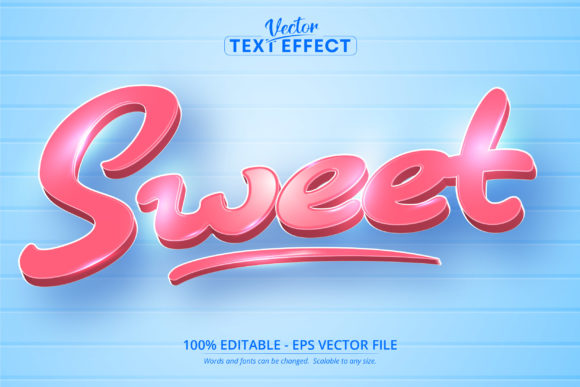
The Sweet Text and Cartoon Text Effect is an Adobe Illustrator-specific file that adds a whimsical and playful look to your text. It allows you to apply cartoon-like styles, colors, and shapes to your typography without compromising editability. Unlike traditional fonts, which may limit customization once applied, this effect lets you modify every part of the text—letters, outlines, colors, and even individual elements—without having to start over or use raster images.
Designed in the EPS CS6 format, it ensures compatibility with Adobe Illustrator versions from CS6 onwards. The key feature here is its editability, as all 100 characters are fully scalable and customizable. Whether you’re designing a logo, a social media post, or a children's book cover, this effect gives you the flexibility to adapt the text to fit your needs perfectly.
Why Use a Font Effect Instead of a Regular Font?
- Customization: With a regular font, you're limited to changing size, color, and weight. But with a font effect like this, you can adjust every detail of each character individually.
- Consistency: Font effects maintain a cohesive look across different platforms when used properly within vector-based software like Illustrator.
- Scalability: Being a vector file means the text can be scaled to any size without losing quality, making it ideal for print and digital projects alike.
- Design Versatility: These effects can be layered, combined with other graphics, or animated (with additional tools), allowing for more dynamic compositions.
How Does the Sweet Text Effect Work in Adobe Illustrator?
When you download and install the Sweet Text and Cartoon Text Effect, you receive an EPS file containing pre-designed characters. Here's how you can work with it:
- Import the File: Open Adobe Illustrator and place the EPS file into your project using the “Place” option under the File menu.
- Edit the Text: Once placed, select the text and change the characters by simply typing over them. The sweet and cartoonish styles will remain intact while adapting to your new input.
- Modify Colors and Styles: You can access individual layers and paths within the text effect to change fill colors, stroke weights, and add gradients or textures.
- Scale Without Quality Loss: Because it's a vector file, you can zoom in or out as needed, and the crispness of the design remains unaffected.
Common Misconceptions About Font Effects
Many people confuse font effects with actual fonts, but they are fundamentally different. Here are some clarifications:
- This is not a font file (like .ttf or .otf). Rather, it’s an effect built around standard fonts, enhancing their appearance with artistic touches.
- It cannot be opened in other software like Photoshop or InDesign directly. To use it outside of Illustrator, you would need to convert the text into a shape or bitmap image first.
- Not all characters might be included in every file. Always check the package description to ensure it supports the language or symbols you need.
Applications in Design and Business
The Sweet Text and Cartoon Text Effect isn’t just for fun designs; it has practical applications across various industries:
Marketing and Advertising
In the world of marketing, attention-grabbing visuals are crucial. Using a cartoon-style text effect can help create a sense of joy and playfulness in promotional materials, especially those targeting younger audiences. For instance, a candy brand launching a new product could use this effect on packaging and social media banners to evoke sweetness and charm.
Education and E-Learning
Educational materials often benefit from engaging visuals. Teachers and instructional designers can use these effects to make learning content more appealing to students. Imagine a science poster about ecosystems where the titles are styled with a cartoon aesthetic to spark curiosity and interest.
Creative Industries and Freelance Work
Freelancers and small business owners who rely on strong visual branding can leverage this effect to stand out. A boutique selling handmade toys might incorporate this style into their website headers, posters, or logos to reflect their creative and child-friendly identity.
Graphic Design Projects
Whether you're working on greeting cards, T-shirt prints, or illustrations, the ability to have fully editable cartoon text makes it easier to experiment with layout and aesthetics. You can tweak the design until it perfectly matches your vision, rather than settling for what a static font offers.
Technical Advantages of Using Vector-Based Text Effects
Vector graphics are a cornerstone of modern design, and the Sweet Text and Cartoon Text Effect takes full advantage of this technology. Below are some technical benefits of using vector-based text effects:
- Resolution Independence: Since vectors are made up of mathematical points rather than pixels, they scale seamlessly without distortion.
- Editable Elements: Each component of the text effect—lines, curves, and fills—can be adjusted independently, giving you total control over the final look.
- Compatibility with Print and Digital Media: Whether you're printing a poster or preparing a digital ad, the clarity and sharpness remain consistent.
- Layered Structure: Most text effects come with organized layers, making it easier to manage complex designs and apply changes selectively.
Example Workflow in Adobe Illustrator
Let’s walk through a simple example to demonstrate how powerful this effect can be:
- Open Adobe Illustrator and create a new document.
- Place the Sweet Text and Cartoon Text Effect EPS file into your canvas.
- Type your desired message using the Type Tool (T). As you type, the effect automatically applies to each letter.
- Select individual letters or words and go into the Appearance panel to change colors, add shadows, or apply gradients.
- Use the Direct Selection Tool (A) to fine-tune anchor points and reshape characters for a more personalized look.
- Export your design as a high-quality PDF, PNG, or SVG depending on your project requirements.
With this workflow, you can quickly turn a basic phrase like "Happy Birthday" into a vibrant, eye-catching headline that stands out.
Enhancing Creativity with Editable Text Effects
One of the biggest advantages of using editable text effects like the Sweet Text and Cartoon Text Effect is the freedom they provide. Designers can explore multiple iterations of a concept without being constrained by the limitations of standard fonts. This encourages creativity and innovation in design thinking.
For example, a designer creating a birthday card might want to try several variations of the same text before finalizing the design. With this effect, they can easily switch between color schemes, add decorations, or even animate the text using plugins or After Effects integration. All of this is possible because the text remains in a vector format that supports layering and manipulation.
Combining with Other Illustrator Tools
To take full advantage of this text effect, consider combining it with other Adobe Illustrator features:
- Live Paint: Use Live Paint to apply color to the text’s strokes and fills as if it were a painting surface.
- Gradients and Blends: Add depth and dimension by applying gradient fills or blending modes to enhance the cartoon feel.
- Symbol Sprayer Tool: If the effect includes decorative elements, you can duplicate and distribute them across the text using the Symbol Sprayer for a more dynamic composition.
- Pathfinder Panel: Combine or subtract shapes to create unique effects or integrate the text with background graphics.
These tools open up endless possibilities for customization and allow you to build more complex and visually rich designs.
Best Practices When Working with Editable Text Effects
While the Sweet Text and Cartoon Text Effect is user-friendly, following best practices can help you avoid common pitfalls and get the most out of your design:
- Keep Layers Organized: Rename layers and groups for easy navigation, especially if you're making detailed adjustments.
- Use Non-Destructive Editing: Wherever possible, apply effects via the Appearance panel so you can modify or remove them later without altering the original artwork.
- Test at Different Sizes: Before finalizing your design, zoom in and out to ensure the effect looks good at all scales.
- Backup Original Files: Save a copy of the original EPS file before making edits, in case you need to reset or reuse it later.
- Experiment with Color Modes: Try CMYK for print and RGB for digital to see how the colors translate in different environments.
By adhering to these guidelines, you’ll streamline your workflow and maintain a professional standard in your output.
Where Can You Find These Types of Effects?
Text effects like the Sweet Text and Cartoon Text Effect are commonly found on design marketplaces such as Adobe Stock, Creative Market, and Etsy. When purchasing, always verify the file format and compatibility with your version of Adobe Illustrator. Look for packages that include clear instructions and support for non-English characters if your project requires it.
Some vendors also offer bonus assets, such as matching icons, backgrounds, or templates, which can complement the text effect and save you time during the design process.
Cost vs. Value Consideration
While these effects may come at a cost, they often prove to be a valuable investment. High-quality, editable text effects reduce the need for custom illustration work, speed up production times, and contribute to a polished, professional finish. For businesses and freelancers, this can mean faster turnaround and better client satisfaction.
Conclusion
The Sweet Text and Cartoon Text Effect represents a blend of creativity and functionality in the realm of graphic design. As an Adobe Illustrator-specific font effect, it empowers users to craft visually stunning, fully editable text that retains scalability and versatility. From branding to educational materials, this tool serves a wide range of purposes, helping designers bring their ideas to life with ease and precision.
By understanding the difference between font effects and standard fonts, you can expand your design toolkit and explore new ways to express your message. Whether you're a beginner learning the ropes or an experienced designer looking for fresh inspiration, incorporating editable text effects into your projects can elevate your work and set it apart in today’s competitive design landscape.
Ready to add a touch of sweetness and whimsy to your next design? Download the Sweet Text and Cartoon Text Effect and start experimenting today!